
← Back to Help Center🌱 Setup & getting started
What is the setup process in Zendesk? How do I get started?
- Start by installing our app from the Zendesk Marketplace. Simply click "Install" and follow the prompts.
- Open any ticket in Zendesk Support, expand the app sidebar and find Easy Ticket AI. See screenshot below.
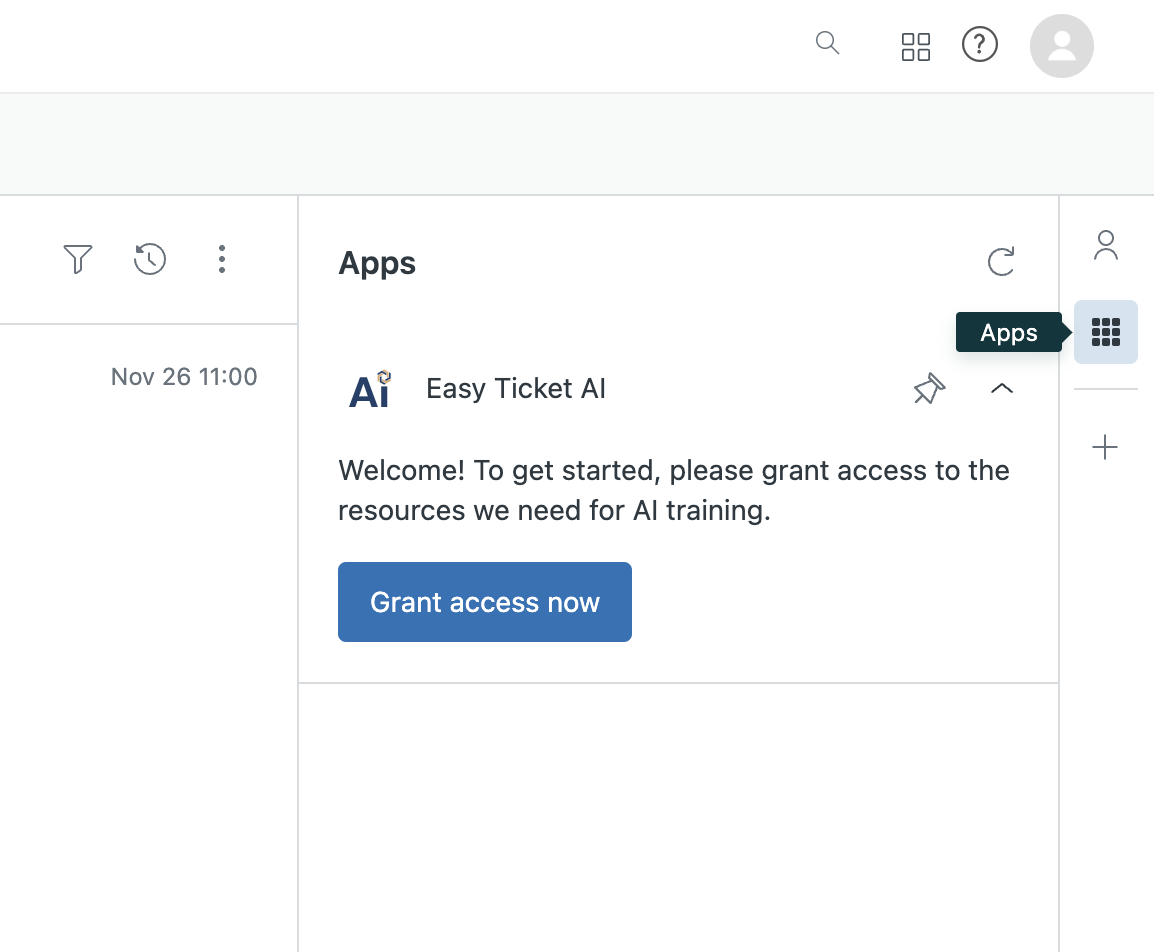
- Click "Grant access now" (only Zendesk team admins have this option, so if you have a regular agent account, please send this guide to your team admin).
- Very soon - usually within 10 minutes - your AI training will be completed and Easy Ticket AI will start working! You can find Easy Ticket AI in the app sidebar - same place as in step 2.
Pro tip: if you have a lot of Zendesk apps in the apps tab, it can get crowded. To ensure quick access to Easy Ticket AI, pin it to your sidebar! Click here to find out how.

©2026. Easy Ticket AI is a product by TechnoQuest Ltd.
Company no. 12518916, registered in England and Wales.
©2026. Easy Ticket AI is a product by TechnoQuest Ltd.
Company no. 12518916, registered in England and Wales.